


For collectors
Pinball collection tracker for the games you own
Pinventory keeps a record for every game in your collection: what you paid, what it is worth, what you have fixed, and what it needs next. All for free.
Free for everyone. No credit card required.
Your collection lives in a spreadsheet, a Pinside list, and your memory, and the three do not agree.
Your insurer asks what the games are worth, and the answer is a guess.
You cannot remember when you last changed the batteries in the game in the corner.
Know what your collection is worth
Record what you paid for each game and what you have put into it since. Pinventory adds a market-value estimate for the title, charts the value of your collection over time, and gives you an insurance valuation to hand to your insurer, so the number is written down before you need it.

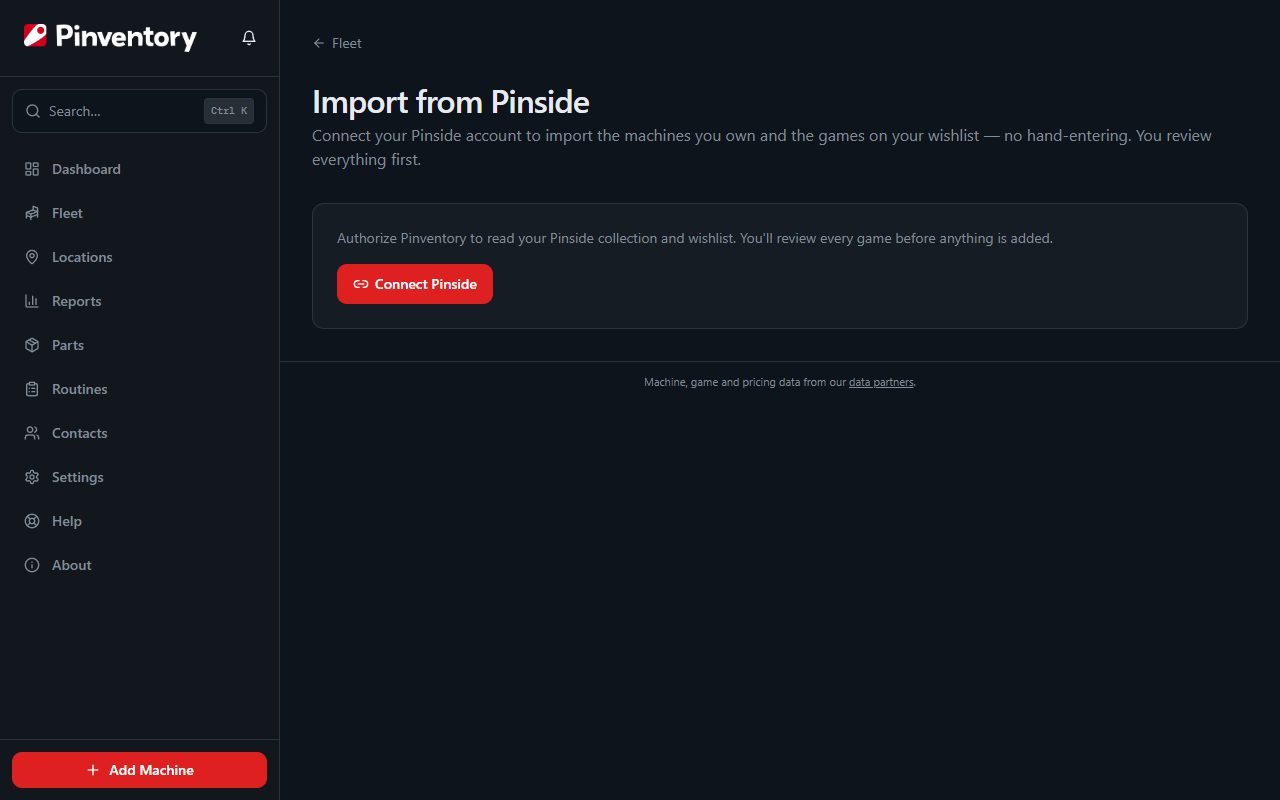
Bring your collection over from Pinside
Connect your Pinside account and import your whole collection and your wishlist in one pass. Add a game by hand from the game catalog, with the edition, the artwork and the manual already attached, or import a spreadsheet.
Keep every game's history with the game
Log each repair with the parts you used, the hours it took and a photo. Record the mods you fitted and what they cost. When you sell the game, the whole history goes on one report for the buyer, and the game stays in your records after it leaves.
The rest of the collection, covered
See all featuresBattery and maintenance reminders
Pinventory warns you about the batteries in older solid-state games before one leaks on a board, and reminds you of any job you set by date or by play count.
Parts and manuals
Track the parts on your shelf, search the parts catalog by name, number or game, and download a game's manual from its page.
Wishlist
Keep the games you want with the edition you are after, and turn a wishlist entry into a game in your collection when you buy it.
Settings backups
Save a Stern or Jersey Jack backup file against the game, and download it when you need to restore the game's settings.
Selling a game
List a game for sale with an asking price, then record the sale price, the date and the buyer. Your records show what the game cost you against what it sold for.
Games you own with someone
Add co-owners to a game with each one's share and what they paid, and see the value each of you holds.
Common questions
Is it really free?
Yes. Everything on this page is free with no ads and no limit on the number of games. Pro adds tracking for arcade and other non-pinball machines, and more.
Which account type does a collector pick?
Pick Collector when you sign up. It drops the route features, such as locations and revenue, and leads with your collection and its value.
Where does the market value come from?
From Pinside market prices for the title. It is an estimate for the title, not an appraisal of your game, and you can set your own value on any game.
Does it work on my phone?
Yes. Pinventory runs on the web and as native iOS and Android apps, so you can log a repair standing at the game.
Can I get my data out?
Yes. Export your whole collection to CSV at any time, or one game's full history to PDF or CSV.
Ready to add your games? The add games guide covers the catalog, a spreadsheet import, and Pinside.
Selling one? The sell a game guide covers listing it, recording the sale, and keeping its history.
Want the whole list? See what Pinventory does for collectors and for operators.
Ready to get your collection out of the spreadsheet?
- Collection value
- Pinside import
- Repair history
- Battery reminders